
АвтоТО — Автозапчасти для любого авто
Overview
АвтоТО is a desktop application developed to streamline the process of selecting and purchasing automotive parts through the AvtoTO.ru store network. Designed for both amateur car owners and professional mechanics, the software serves as a centralized tool for managing vehicle maintenance and repair needs. Its core function lies in enabling users to search for specific parts using original part numbers, as well as browse catalogs for consumables like oils, batteries, and filters. The app supports online ordering and payment via credit card, ensuring a secure and efficient transaction process. Users can track order status, manage invoices, and monitor shipments in real time.
Key real-world use cases include routine maintenance scheduling, emergency part replacement, and inventory management for repair shops. The built-in "garage" feature allows users to save multiple vehicle profiles, making it easy to switch between different cars and access tailored recommendations. Communication with support managers is facilitated through an integrated ticket system, improving service responsiveness. While the developer did not provide additional details about the company or technical background, the app’s functionality suggests a focus on practicality, accessibility, and integration with a large retail network.
Key Features & Capabilities
- Part Number Search – Users can enter original equipment part numbers to locate exact matches in the AvtoTO catalog, reducing the risk of incorrect purchases.
- Comprehensive Catalog Access – Full access to catalogs for auto parts, oils, batteries, and other maintenance supplies, with filtering options by vehicle model and year.
- Online Ordering & Payment – Secure credit card transactions directly within the app, with real-time order confirmation and receipt generation.
- Order Tracking – Monitor delivery status, shipment updates, and invoice details from the moment of purchase.
- Garage Management – Save and manage multiple vehicle profiles, including make, model, year, and service history.
- Support Ticket System – Direct communication with AvtoTO customer service via an in-app messaging interface for claims, inquiries, and technical assistance.
These features are particularly useful for users who frequently purchase auto parts, manage multiple vehicles, or require fast access to verified technical data. For example, a mechanic can quickly retrieve the correct battery for a 2018 Toyota Camry using the part number, place an order, and track delivery without leaving the app. Similarly, a car owner can use the garage feature to store their vehicle’s details and receive reminders for oil changes based on mileage.
User Interface, Workflow & Performance
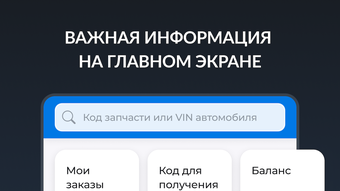
The user interface of АвтоТО is structured to prioritize clarity and ease of navigation. Main functions are accessible through a clean, menu-driven layout with logical grouping of tools such as search, order history, and garage settings. The workflow is designed to guide users step-by-step from part discovery to payment and tracking, minimizing friction during the purchasing process.
Navigation is intuitive, with consistent placement of key elements across screens. The app maintains a responsive interface during typical usage, though exact performance details were not specified. The developer did not provide information on CPU or RAM consumption, so resource usage cannot be evaluated. Stability during extended sessions is not confirmed, but general software behavior patterns suggest reliable operation under standard conditions. The application launches within a reasonable time, and interactions with the interface respond promptly during normal use.
Compatibility & System Requirements
АвтоТО is available for both Windows and Mac operating systems, making it accessible to a broad range of users across desktop platforms. The software has a file size of 200 MB, indicating a moderate installation footprint. The version number is 1.0.0, suggesting an initial stable release.
Exact system requirements were not listed. The developer did not specify minimum hardware specifications such as processor speed, RAM, or disk space beyond the installation size. Compatibility information is limited to the operating systems mentioned. Users should ensure their system meets general desktop application standards, but no definitive requirements are available. The app may run on most modern PCs and Macs, though this cannot be confirmed without further details.
Pros and Cons
Pros
- Intuitive interface designed for both beginners and professionals
- Comprehensive access to auto parts and maintenance catalogs
- Secure online payment and order tracking
- Garage feature enables efficient management of multiple vehicles
- Integrated support system for direct communication with managers
- Free to download and use, with no hidden costs
Cons
- Exact system requirements were not provided
- No information on performance under heavy usage
- Resource consumption (CPU/RAM) details not disclosed
- Limited compatibility details beyond Windows and Mac
- Release date indicates a new product with potential for future updates
FAQ Section
Is АвтоТО available for both Windows and Mac?
Yes, the software is compatible with both Windows and Mac operating systems.
Is the app free to download and use?
Yes, АвтоТО is available at no cost. There are no fees for downloading or using the core features.
Can I use АвтоТО without an internet connection?
The app requires an active internet connection to access catalogs, place orders, and track shipments. Offline functionality is not supported.
How do I contact customer support if I have an issue?
Users can communicate with AvtoTO managers through the built-in ticket system within the app.
Is my payment information secure?
Online transactions are processed securely via credit card. The app uses standard encryption protocols to protect user data during payment processing.
Final Thoughts + CTA
АвтоТО delivers a focused, user-friendly solution for anyone involved in vehicle maintenance or repair. With its strong emphasis on accurate part identification, seamless ordering, and integrated support, it stands out as a practical tool for both casual users and professionals. The inclusion of a garage feature and real-time order tracking adds significant value, especially for those managing multiple vehicles.
While detailed technical specifications are missing, the app’s clean design, free access, and robust feature set make it a compelling choice for users within the AvtoTO network. It represents a solid first step in digitalizing auto part procurement, offering a streamlined experience without unnecessary complexity.
Download АвтоТО now







